
The Importance of Preventive IT Maintenance for South African Businesses
August 17, 2026
Your Employee Used ChatGPT With Client Data. Now What?
October 15, 2026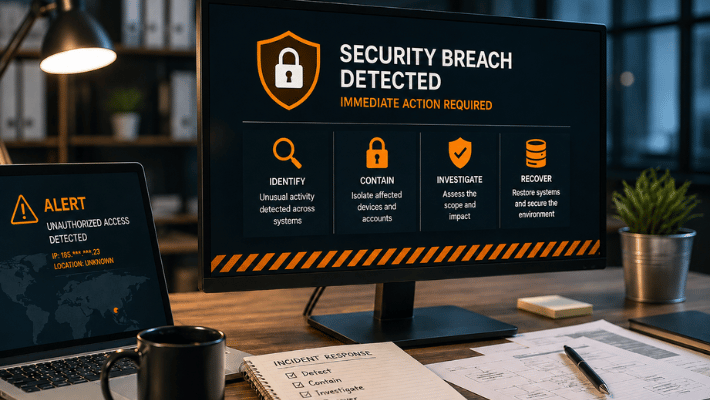
A suspicious login, ransomware message or compromised email account can quickly turn into a serious business problem.
When a cybersecurity breach happens, the first few actions matter. Acting too slowly can give an attacker more time inside your systems, but reacting without a plan can also cause problems — especially if devices are wiped, logs disappear or backups are restored before the threat has been removed.
For South African businesses, there is another consideration. If personal information has been compromised, the Protection of Personal Information Act (POPIA) may also require notification to the Information Regulator and affected individuals.
The priority is therefore to contain the incident, understand what happened, protect your data and restore systems safely.
1. Confirm What You Know — Without Waiting for Every Answer
A cybersecurity breach does not always announce itself with a ransom note.
Warning signs could include:
- unusual Microsoft 365 logins
- unexpected password resets
- suspicious email forwarding rules
- files suddenly becoming encrypted
- antivirus or endpoint security alerts
- unknown administrator accounts
- unexplained network activity
- emails being sent from an employee’s account without their knowledge
Start by recording what was noticed, when it happened and which users, computers or systems appear to be affected.
You do not need to understand the entire attack before taking action.
CISA’s incident-response guidance recommends identifying affected systems and beginning containment quickly, while continuing to investigate the wider scope of the incident.
2. Isolate Affected Devices and Accounts
If a workstation or server appears to be compromised, one of the first technical priorities is preventing the attacker or malware from spreading further.
This may involve disconnecting an affected computer from Wi-Fi or the network, isolating it through endpoint security software, blocking a compromised user account or restricting remote access.
Modern endpoint detection and response (EDR) tools can provide administrators with the ability to isolate a device while still allowing the security platform to investigate it. Microsoft Defender for Endpoint, for example, supports device isolation specifically to help prevent further attacker activity, data theft and lateral movement through the network.
However, avoid simply switching everything off or formatting affected computers immediately.
Logs, security alerts and other information may be needed to determine how the breach occurred and what else was affected.
3. Secure Compromised User Accounts
Many modern attacks begin with an account rather than a computer.
A stolen Microsoft 365 password can potentially give an attacker access to email, shared documents and other cloud resources. Changing the password is important, but it may not be enough on its own.
Microsoft recommends additional steps when a Microsoft 365 account is compromised, including revoking active sessions, reviewing registered MFA methods, checking application permissions and looking for suspicious email forwarding or inbox rules.
Administrators should also review recent sign-in activity for unusual locations, applications or IP addresses.
If an attacker has added their own authentication method or created a hidden forwarding rule, a password change alone may leave another way back into the account.
4. Work Out How Far the Breach Reached
Once the immediate threat is contained, the next question is:
What was actually affected?
This is where security monitoring and logging become important.
IT teams may review:
- firewall and network logs
- antivirus and EDR alerts
- Microsoft 365 and Entra sign-in records
- administrative changes
- email forwarding rules
- file access activity
- servers and shared folders
- newly created accounts or applications
Microsoft’s current identity-security guidance recommends reviewing sign-in logs, affected resources and related accounts when investigating suspected compromised identities.
The objective is not simply to find the computer where the problem was first noticed. You need to determine whether the attacker moved elsewhere before being detected.
5. Protect Your Backups Before Restoring Anything
Backups become especially important during ransomware or destructive attacks.
But a backup is only useful if it is still clean and recoverable.
CISA recommends maintaining offline or otherwise protected backups and regularly testing restoration. Its ransomware guidance specifically warns that attackers may attempt to encrypt or delete accessible backups as part of an attack.
Before restoring systems, confirm:
- which backups existed before the breach
- whether the backups themselves were affected
- when the compromise may have started
- whether the environment you are restoring into is clean
Restoring yesterday’s backup into a network where the attacker still has access can simply restart the problem.
Mezobyte provides onsite and offsite backup solutions as well as disaster recovery services designed to protect business data and support recovery after disruption.
6. Remove the Cause Before Returning to Normal
Recovery should not mean simply putting everything back the way it was.
The original weakness needs to be addressed.
Depending on the incident, this might include:
- removing malware
- closing unauthorised remote access
- patching vulnerable software
- resetting passwords
- removing suspicious accounts
- correcting firewall rules
- removing malicious email forwarding
- reviewing administrator privileges
- strengthening MFA
- updating endpoint protection
CISA also recommends reviewing account privileges, security controls and network segmentation after an incident to reduce the ability of attackers to move from one system to another.
Only once the affected environment is considered clean should systems and data be brought back into normal operation.
7. Don’t Forget Your POPIA Responsibilities
Not every cyber incident is a personal-information breach, but if personal information has been compromised, South African businesses need to consider POPIA.
The Information Regulator’s 2025 guidance states that POPIA does not have a minimum risk threshold for reporting security compromises. Where a reportable compromise has occurred, the responsible party must notify the Information Regulator and affected data subjects.
The Regulator advises notification as soon as reasonably practicable once the organisation is reasonably sure a security compromise has occurred. The investigation does not need to be finished first, and additional information can be supplied later.
The organisation’s Information Officer or Deputy Information Officer should therefore be involved early.
This part of the response may also require legal or POPIA compliance advice. Your IT provider can establish the technical facts, but legal and regulatory decisions should not simply be left to the IT team.
8. Learn From the Incident
Once systems are running again, conduct a review.
Ask how the attacker got in, why the activity was not detected sooner and which controls could reduce the risk of the same thing happening again.
That may lead to improvements such as better monitoring, stronger endpoint security, updated firewalls, MFA, improved backup procedures or tighter device and user access controls.
Mezobyte’s IT security offering includes areas such as firewalls, antivirus protection, VPNs and device management, while its managed IT services cover IT support, Microsoft 365, backups, disaster recovery and server solutions.
The goal is not to assume that another incident will never happen. It is to make sure your business is better prepared to detect, contain and recover from one.
Have a Plan Before You Need It
The worst time to decide who is responsible for your backups, Microsoft 365 security or server recovery is after an attack has already started.
A practical cybersecurity response depends on knowing what systems you have, who has access to them, where your backups are stored and who to contact when something goes wrong.
With managed IT support, security controls, monitoring, backup and disaster recovery already in place, businesses can respond far more effectively when an incident occurs.
Mezobyte provides IT security and managed IT services for South African businesses, including IT support, Microsoft 365, backup and disaster recovery solutions. Having those systems properly managed before a breach can make the difference between a contained IT incident and prolonged business disruption.


