5 Ways VoIP Reduces Communication Costs for SMEs
April 17, 2026
How South African Businesses Can Reduce Microsoft 365 Licensing Costs
July 7, 2026
Downtime is costly – both financially and operationally. For South African SMEs, where teams often juggle multiple roles, even a few minutes of system failure can lead to lost productivity, missed opportunities, and expensive emergency fixes. IT monitoring services offer a practical solution by continuously tracking your systems, identifying potential issues, and addressing them before they escalate.
Key Takeaways:
- What It Is: Continuous IT monitoring ensures 24/7 oversight of servers, networks, and devices, enabling early detection of problems.
- Why It Matters: South African SMEs face challenges like load shedding, connectivity issues, and security threats. Monitoring helps mitigate these risks, preventing downtime and protecting sensitive data.
- Benefits: Reduced downtime by up to 60%, lower maintenance costs (up to 25%), and faster issue resolution, often within 15 minutes.
- Key Tools: Solutions like Prometheus, Pingdom, and PagerDuty provide real-time alerts, automated fixes, and detailed performance insights.
By implementing IT monitoring, small businesses can avoid costly disruptions, improve productivity, strengthen security, and ensure smoother operations. This approach shifts IT from being a reactive cost to a reliable business enabler.
Key Benefits of IT Monitoring for SMEs
Implementing IT monitoring can reshape how your business operates, protects its data, and manages expenses. For South African SMEs, this approach enhances operational efficiency while keeping costs under control.
Less Downtime and Better Productivity
Continuous IT monitoring ensures smoother operations by reducing disruptions. Downtime can derail your business, halting progress, delaying service delivery, and cutting off client communication. However, automated alerts can detect risks in your infrastructure early, allowing remote fixes before issues spiral. In fact, businesses adopting proactive IT strategies can cut unexpected downtime by up to 60%.
Around-the-clock monitoring identifies bottlenecks and vulnerabilities before they become major problems. Many of these issues can be resolved after hours, ensuring your team starts the day without interruptions. With these tools in place, IT teams can act swiftly, keeping operations on track and allowing your staff to focus on their core work instead of troubleshooting.
Better Security and Data Protection
Continuous monitoring doesn’t just detect suspicious activity – it also addresses potential security gaps. Automated vulnerability scans assess your network for weaknesses, prioritising them based on severity and actual risks.
“Proactive cybersecurity is what you do before a cyber attack to manage your exposure; reactive security is what you do after to contain it and minimise the damage.” – Ivanti
Monitoring tools can also uncover “shadow IT” – unauthorised devices or software that expose your business to risk. Features like automated patch updates and settings enforcement (e.g., multi-factor authentication and encryption) help close these gaps without requiring manual intervention, keeping your data safer.
Cost Savings Through Predictive Maintenance
For SMEs, downtime can cost anywhere from R90,000 to R360,000 per hour. Predictive maintenance helps avoid these expenses by spotting early warning signs, such as high CPU usage or failing hardware, before they lead to costly outages. Proactive IT management can lower overall IT maintenance expenses by 25%.
sbb-itb-e5523aa
IT Monitoring Tools and Strategies
Proactive IT monitoring relies on a combination of tools and strategies to keep systems running smoothly. Below is a closer look at the key components that make this approach effective.
Modern monitoring tools work around the clock to track system performance. For instance, Mezobyte utilises Prometheus to monitor system metrics and server health, providing detailed insights into infrastructure performance. To ensure websites and services remain available, tools like Pingdom and Freshping continuously check uptime, helping maintain a stable online presence.
Server Health Checks and Network Performance Monitoring
Server health monitoring focuses on critical metrics such as CPU usage, memory consumption, disk I/O, and hardware conditions like temperature and fan speed. These metrics establish performance baselines, making it easier to identify anomalies. Real-time data is collected through protocols like SNMP and WMI. Mezobyte’s network infrastructure, featuring 10 gbps connections to NAPAfrica IX in Johannesburg and Cape Town, is backed by multiple upstream providers, including SEACOM, Angola Cables, and Cogent Communications. This setup ensures low latency and reliable connectivity across South Africa.
“Network performance monitoring is no longer just about fixing problems when they happen. It’s about spotting them before they even show face.” – Techtron
Threshold-based alerts are essential for pre-empting issues. For example, alerts can trigger when CPU usage exceeds 90% or when disk space drops below 10%. Automated workflows can address problems immediately, such as restarting a service or clearing temporary files when storage limits are reached. Devices are typically polled every two minutes, and if two consecutive pings fail, the system flags the device as unavailable.
By closely monitoring system metrics, organisations can address issues quickly and efficiently.
Real-Time Alerts and Automated Notifications
Real-time alerts are crucial for rapid incident response. Tools like PagerDuty facilitate instant notifications, ensuring that teams are informed as soon as issues arise. Organisations using real-time alerting often experience a 60–80% reduction in the impact of incidents and resolve issues 75% faster on average. Alerts should be categorised into Critical, Warning, and Info levels to avoid overwhelming teams with unnecessary notifications. Critical issues, like system outages or security breaches, should prompt immediate alerts via SMS, phone calls, or instant messaging. Less urgent warnings, such as minor performance dips, can be sent via email or Slack within a 15-minute window.
Statuspage helps maintain transparency by providing real-time updates on system status and downtime during maintenance or unexpected outages. Implementing dependency awareness can prevent alert storms by suppressing downstream alerts when an upstream failure is already identified. Additionally, two-way communication allows teams to acknowledge alerts and update coordinators on progress, ensuring efficient incident management.
Backup Monitoring and Disaster Recovery
Mezobyte offers both onsite and offsite backup solutions to safeguard data during emergencies. Backup monitoring ensures that systems are functioning properly, with automated alerts flagging any failures or incomplete backups. Regular verification checks confirm that backup files are intact and recoverable. A solid disaster recovery plan, including detailed restoration procedures, can significantly reduce downtime costs, which can range from R90,000 to R360,000 per hour for South African SMEs.
Mezobyte’s tech stack includes Microsoft Exchange Online, Office 365, and SharePoint, all of which play a role in managed IT services and disaster recovery. These tools and strategies are essential for minimising downtime and ensuring operational continuity for SMEs in South Africa.
How to Implement IT Monitoring for Your Business
Setting up IT monitoring doesn’t have to be a daunting task. South African SMEs can follow a simple, structured process to keep their systems running smoothly.
Step 1: Review Your IT Infrastructure
Start by mapping out your entire IT environment. Create a detailed inventory of all your assets – this includes servers, endpoints, network devices (like switches, routers, and firewalls), and cloud platforms. Doing this can also help you identify any unauthorised installations lurking in your network. Using RMM (Remote Monitoring and Management) tools can make this process faster and more accurate.
Next, establish performance baselines by recording what normal operations look like. This includes typical CPU usage, memory consumption, network traffic, and disk space levels. These baselines are crucial for recognising unusual activity later on. Analysing historical data can also help you spot recurring issues, such as sluggish databases or servers that tend to overheat.
“It’s the difference between changing your car’s oil regularly versus waiting for the engine to seize up on the highway.” – Michael Becker, Paessler
It’s equally important to categorise your systems based on their importance: critical, essential, or non-essential. For example, a customer-facing website or financial database should be prioritised for intensive monitoring. Additionally, locate where sensitive data is stored, understand any retention requirements, and check for outdated hardware or unlicensed software that could pose security risks.
Once you’ve documented your assets and set performance baselines, you’re ready to deploy the right monitoring tools.
Step 2: Set Up Monitoring Tools and Configure Alerts
With a clear understanding of your infrastructure, the next step is to deploy monitoring tools that align with your specific business needs. Look beyond technical specifications and focus on tools that fit your operational goals. Set up monitoring for key areas like bandwidth usage, latency, packet loss, and device status. Automated alerts should be configured to flag deviations from your performance baselines.
To prevent alert fatigue, categorise notifications by urgency. This way, critical issues trigger immediate alerts, while minor ones can be monitored without overwhelming your team. Many problems flagged by proactive monitoring can be resolved remotely, which saves both time and the expense of on-site troubleshooting. Also, ensure that your monitoring tools integrate seamlessly with your current setup and can grow alongside your business.
After setting up your tools and alerts, keep the momentum going with regular reviews and adjustments.
Step 3: Regular Reviews and Scaling Your Monitoring
IT monitoring isn’t a one-and-done process. Conduct regular reviews – monthly or quarterly – of system health reports to identify long-term trends and address potential issues before they escalate. Use historical data to plan for capacity upgrades, ensuring your systems can handle future demands. This proactive approach can help SMEs reduce operational costs by as much as 20%.
As your business expands, your monitoring needs will change. Choose tools that can scale with your growing infrastructure. Interestingly, about 38% of young SMEs (operating for five years or less) become “scalers”, particularly in tech-driven sectors. These businesses often invest in skilled personnel to manage advanced monitoring and automation tools.
Reactive vs Continuous IT Monitoring: A Comparison
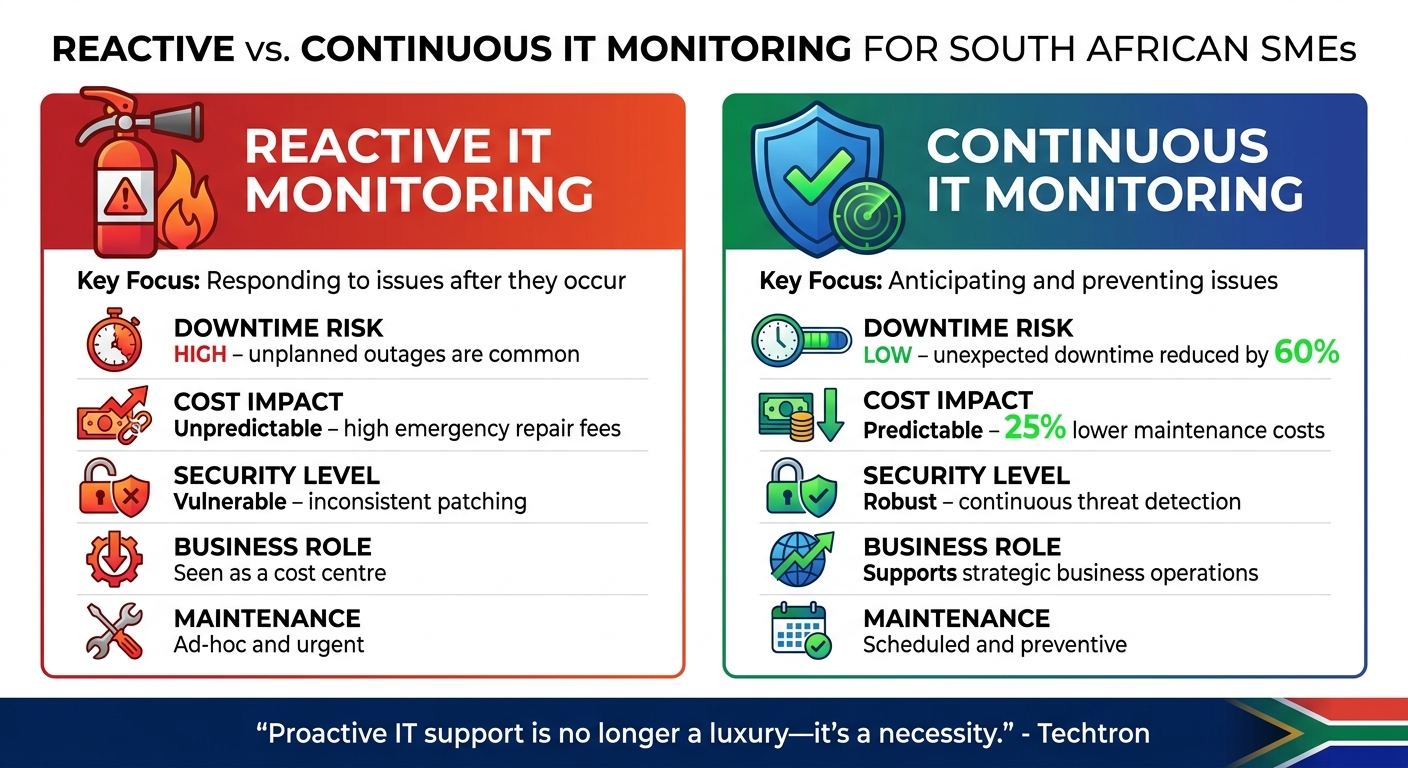
Reactive vs Continuous IT Monitoring: Key Differences for SMEs
Reactive monitoring and continuous monitoring take very different approaches to managing IT systems. Reactive monitoring steps in only after problems disrupt your operations, treating IT as a cost to control. On the other hand, continuous monitoring keeps an eye on systems 24/7, aiming to catch and fix potential problems before they cause any harm.
The financial impact of these approaches is stark. With reactive IT, businesses face unpredictable costs from emergency fixes and downtime. Continuous monitoring, however, operates on predictable monthly fees and can reduce overall IT maintenance expenses by up to 25%. For small businesses, downtime can be especially costly – just one hour can mean losses of thousands of rands.
“Proactive IT support is no longer a luxury – it’s a necessity.” – Techtron
Security is another critical area where the two differ. Continuous monitoring provides consistent patching, real-time threat detection, and layered security measures, offering round-the-clock protection. This makes it clear why a proactive, continuous approach is essential for maintaining smooth business operations. The table below breaks down the key differences between these two methods.
Comparison Table: Reactive vs Continuous Monitoring
| Feature | Reactive IT Monitoring | Continuous IT Monitoring |
|---|---|---|
| Key Focus | Responding to issues after they occur | Anticipating and preventing issues |
| Downtime Risk | High; unplanned outages are common | Low; unexpected downtime reduced by 60% |
| Cost Impact | Unpredictable; high emergency repair fees | Predictable; 25% lower maintenance costs |
| Security Level | Vulnerable; inconsistent patching | Robust; continuous threat detection |
| Business Role | Seen as a cost centre | Supports strategic business operations |
| Maintenance | Ad-hoc and urgent | Scheduled and preventive |
Conclusion: Maintaining Business Continuity with IT Monitoring
For South African SMEs, keeping a close eye on IT systems is crucial for ensuring uninterrupted operations. By spotting issues before they spiral out of control, businesses can cut unexpected downtime by as much as 60% and lower maintenance expenses by 25%. This approach shifts IT from being a reactive cost burden to becoming a proactive, strategic asset. Instead of dealing with unpredictable emergency costs, continuous monitoring delivers predictable monthly expenses while safeguarding two of your most critical assets: your reputation with clients and the sensitive data that powers your business.
Experts in the field highlight the importance of this proactive approach:
“Proactive IT management is no longer an optional strategy but a critical requirement for organisations seeking to remain competitive and resilient in an increasingly complex digital environment.” – Techtron
The advantages go beyond just saving money. Continuous monitoring also strengthens cybersecurity by enabling real-time threat detection and ensuring compliance with South African laws like POPIA. It provides the tools to catch unauthorised access attempts, unusual network activity, and system weaknesses before they turn into major problems.
For SMEs with limited IT teams, features like automated alerts and around-the-clock monitoring let you concentrate on growing your business. With over 60% of companies facing costly outages annually, staying ahead of potential IT issues isn’t just about avoiding disruptions – it’s about giving your business the tools to succeed in today’s fast-paced digital world.
FAQs
What should I monitor first in my business?
Pay close attention to how your network is performing by tracking key metrics such as bandwidth usage, latency, packet loss, and device connectivity. Regularly reviewing these metrics can help you spot potential problems early on. This approach not only helps prevent downtime but also ensures your operations run smoothly.
To make this process easier, consider using network performance monitoring tools. These tools allow you to address issues before they escalate, keeping your systems and data secure.
How do I set alert thresholds without getting spammed?
To keep alerts meaningful and avoid being overwhelmed by unnecessary notifications, consider using dynamic or baselined thresholds instead of static ones. These thresholds adjust to the system’s usual behaviour, helping to cut down on false positives.
Take advantage of historical data and multi-metric correlations to set thresholds that accurately identify real issues. Also, make it a habit to review and refine these settings regularly with your IT team. This way, you’ll maintain relevant alerts and reduce fatigue while still catching potential problems early.
Can monitoring still work during load shedding?
Yes, monitoring can still function during load shedding if you have uninterruptible power supplies (UPS) or backup generators in place. These systems help keep your monitoring tools and equipment running during power outages, reducing the risk of interruptions.